Headless test runs and reports
The same tests you run from the palette (Testing skills) can run without the terminal UI, from the command line. Use it for a scheduled run (cron, a systemd timer), for CI, or to make a report you can share: with a skill's maintainer, in an issue, or with a skill store.
ovos-tui --run all
ovos-tui --run ovos-skill-weather.openvoiceos
ovos-tui --run ~/.config/ovos-tui-client/scripts/smoke.jsonl
These are real utterances
Exactly as in the UI: the sentences go to your live OVOS, so timers, alarms and media really happen. Every step runs in its own session, and that session is stopped afterwards.
What it does
- Connects to the messagebus (
--host,--port, default127.0.0.1:8181). - Waits for OVOS to list its skills, asking again a few times if it is busy (same as the UI). If it never answers, nothing is tested.
- Looks up the golden utterances for what you asked for, in your
--lang:allmeans every installed, active skill; askill_idmeans that skill; a.jsonl/.txtfile is one of your own scripts. -
Runs every step and prints one line each:
[1/4] ✓ "what's the weather" ovos-skill-weather.openvoiceos:weather.intent [2/4] ✗ "will it rain" expected ovos-skill-weather.openvoiceos, got ovos-skill-wolfie.openvoiceos Test: ovos-skill-weather.openvoiceos: 3/4 passed · 1 failed · 21s -
Saves the result, like Test: Save result in the TUI: a readable
.mdand the shareable.report.json(below), which also says what was tested against.
Exit code: 0 every checked step passed, 1 something failed or timed
out (or the run was stopped with Ctrl+C), 2 it could not run: no bus, no
skill list, or nothing to test.
Options
| Option | |
|---|---|
--run TARGET |
all, a skill_id, or a script file. |
--lang |
The language of the utterances (default en-us). |
--output DIR |
Where the .md and .report.json go (default ~/.local/share/ovos-tui-client/results). |
--report FILE |
Also put a copy of the report in FILE (below). - prints it, for copy-paste; progress then goes to stderr. |
--report-replies |
Include what OVOS said in the report. Off by default. |
--channel NAME |
The release channel of this install, if it can't be worked out automatically (below). |
--notes TEXT |
Free text for the report, e.g. what the skill needs: "OpenWeather API key set", "Mark II". |
--submit-url TEMPLATE |
A skill store's report link, so the share page can open the store with the report filled in (below). Asked for when not set. |
--share / --no-share |
Serve the report on a short link even when not run from a terminal / never. From a terminal it's shared by itself. |
--golden-dir DIR |
Local skill checkouts to take golden utterances from, before GitHub. |
What was tested against: the manifest
A result is only useful if it says exactly which install produced it. The manifest records:
- channel: the OVOS release channel (
stable,testing,alpha) and how it was found (channel_source). What the install declares (the OVOS installer's state file, raspOVOS's/opt/ovos/tag) is checked against the installed versions and each channel's constraints file as it is today; with nothing declared, as on Docker, Buildroot or a hand-made venv, the versions alone decide.--channeloverrides it. See Release channels. - stack: the versions of the packages that decide how skills load and where an utterance goes: ovos-core, ovos-workshop, ovos-bus-client, ovos-plugin-manager, the intent engines, the pipeline plugins.
- skills: each tested skill's package and version.
- installed: every skill on the device (id, package, version, active),
not only the tested ones, so a reader can see what the test ran alongside.
pipeline_plugins: the installed pipeline plugins and their versions
(which stages could run; the order that does run is
config.pipeline). - steps_from / steps_note: where each skill's steps came from, and a note when golden files came from a repo's default branch (possibly newer than the installed release). Normally they come from the installed version's tag; see where the test utterances come from.
- config:
lang,secondary_langs, the intent pipeline order, and the STT and TTS plugin names (only the names: a plugin's own settings can hold keys or server addresses, so they are never read into the report). - machine: architecture, and the board model when there is one
(
Raspberry Pi 5, a Mark II ...). - when, and which ovos-tui-client version.
Run it on the device itself
The versions are read from the Python environment ovos-tui-client runs
in. The OVOS installer puts ovos-tui-client in the same environment as
OVOS, so on the device they are OVOS's own. Pointed at a bus on another
machine (--host), they would describe the wrong install, so they are
left out and the manifest says "versions_from": "unavailable".
The shareable report
Every run saves one JSON document, ovos-test-report/1, as ….report.json
next to the .md, with the manifest, a summary and one row per step.
--report puts a copy where you want it, or prints it:
{
  "schema": "ovos-test-report/1",
  "title": "Test: ovos-skill-weather.openvoiceos",
  "manifest": {
    "channel": "testing", "channel_source": "ovos-installer", "bus": "local",
    "stack": { "ovos-core": "2.1.0", "ovos-workshop": "7.0.6", "...": "..." },
    "skills": { "ovos-skill-weather.openvoiceos": { "package": "ovos-skill-weather", "version": "1.2.0",
                                                    "steps_from": "https://raw.githubusercontent.com/..." } },
    "installed": [ { "id": "ovos-skill-alerts.openvoiceos", "package": "ovos-skill-alerts", "version": "0.1.28", "active": true },
                   "..." ],
    "pipeline_plugins": { "ovos-common-query-pipeline-plugin": "1.1.9", "...": "..." },
    "config": { "lang": "en-us", "secondary_langs": ["da-dk"], "pipeline": ["..."],
                "stt": "ovos-stt-plugin-server", "tts": "ovos-tts-plugin-piper" },
    "machine": { "arch": "aarch64", "model": "Raspberry Pi 5 Model B Rev 1.0" },
    "created_at": "2026-10-04T18:12:00Z", "tool": "ovos-tui-client 0.3.0"
  },
  "summary": { "steps": 4, "checked": 4, "passed": 3, "failed": 1, "answered": 4, "...": "..." },
  "steps": [
    { "i": 1, "utterance": "what's the weather", "lang": "en-us",
      "expected": "ovos-skill-weather.openvoiceos:weather.intent", "status": "pass",
      "handled_by": "ovos-skill-weather.openvoiceos:weather.intent", "answered": true }
  ],
  "notes": "OpenWeather API key set"
}
Private by default. The report holds no hostname, IP address, user name
or home path, and nothing from any skill's settings, where API keys live.
OVOS's replies are left out too, because they can contain personal data
("it's 14 degrees in your town"); the report only says whether OVOS
answered. Add them with --report-replies for a report you keep yourself.
Read the report before you share it; it is plain JSON.
Getting the report off the device
ovos-tui-client does not know about any skill store or service, and sends nothing anywhere by itself. You decide where a report goes. Most people test on the OVOS device over ssh, where the clipboard is the hard part, so there are several ways:
-
A short link (from a terminal, by itself). When you run it from a terminal, the report is served on a short, temporary link from the device, and the command it needs to fetch the file is printed:
Open the report in your browser (Ctrl+click): http://192.168.1.50:41733/q3v9XcA2Lk0e/
  Copy, Download, and 'Open detailed page' (the store's page with the report filled in). The link works for 15 min.
Or fetch the file: scp ovos@192.168.1.50:/home/ovos/.local/share/ovos-tui-client/results/2026-10-01_101500_test-ovos-skill-weather-openvoiceos.report.json .
Press Enter when you're done with the link...
Ctrl+click (or copy) the link on your own computer. The page shows the report with Copy report and Download report.json, and, when a store link is set (below), Open detailed page, the store's page with the report filled in:
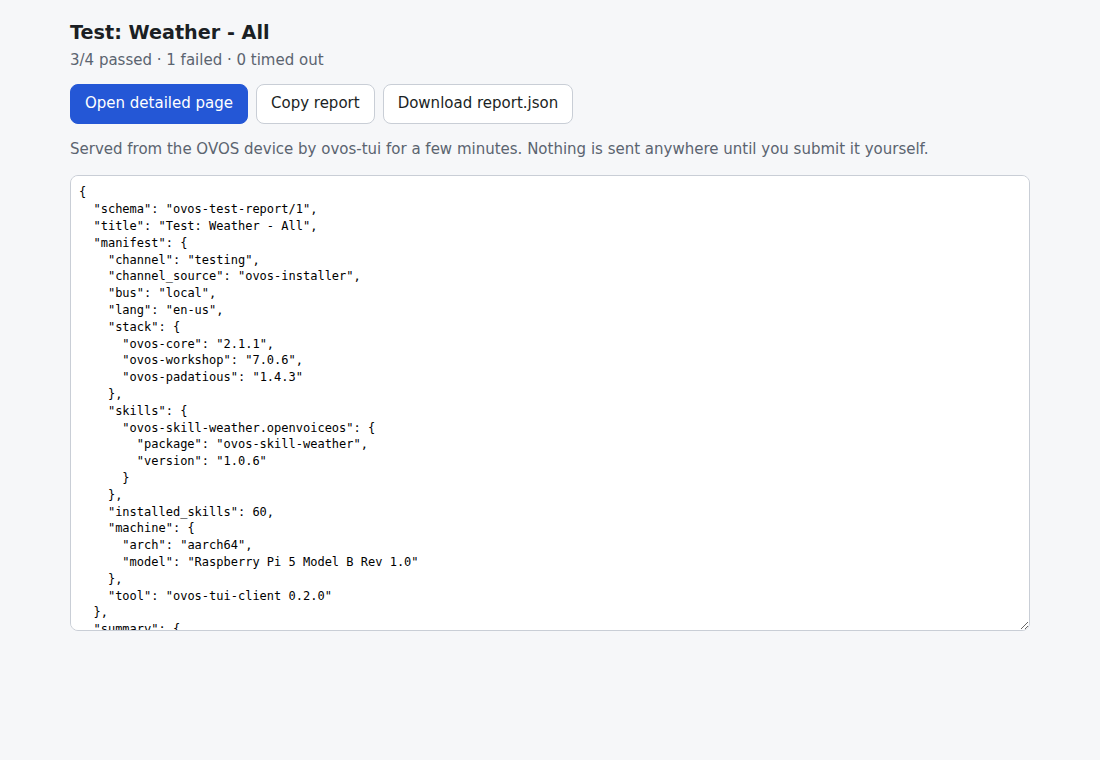
The link is read-only, carries a random token, serves this one report and stops when you press Enter or after 15 minutes. It works on the same network as the device.
--no-shareturns it off;--sharealso serves it from a script (it then stays up the 15 minutes). - The file: the….report.jsonin the results folder (or a copy where you want it with--report report.json). Fetch it with the printedscpcommand and attach or upload it. - Copy-paste:--report -prints it; paste it where you want it.
A skill store's report link
A store can give a link template that opens its own page with the report filled in. You don't submit anything from the device: the store's page shows the report, checks it, and you submit it there yourself.
When no store link is set and you run from a terminal, ovos-tui-client asks for it, and says that it never submits anything. Paste the link from the store's instructions, or press Enter to skip; a skipped question comes back next time. Set or change it any time:
--submit-url 'https://…'on the command line,- in the TUI:
Ctrl+P→Settings: Skill store report link, -
or in
~/.config/ovos-tui-client/config.json:{ "submit_url": "https://example.org/report?skill={skill_id}#report={report_fragment}" }
Placeholders, each filled in and URL-encoded:
| Placeholder | |
|---|---|
{report_fragment} |
The report packed for the part of a link after #: gzip, then base64url. That part never goes to a server, and a one-skill report is ~2-5 KB. Preferred. |
{report} |
The report as JSON, for a query string. Limited to about 8 KB; longer reports say so. |
{skill_id} |
The tested skill, when there is one. |
{channel} |
The release channel. |
{title} |
The run's title. |
For a store: unpack {report_fragment} in the browser with
atob → DecompressionStream("gzip") → JSON.parse.
The TUI saves the same two files after an ordinary run: Ctrl+P →
Test: Save result…. See Testing skills.
Scheduled runs
A nightly run of everything, keeping the results, for example with cron:
30 3 * * * ~/.venvs/ovos/bin/ovos-tui --run all --output ~/ovos-test-results >> ~/ovos-test-results/cron.log 2>&1
The exit code tells a timer or CI job whether everything passed.